
Repair, Refresh or Replace? Building a Smarter Technology Lifecycle Strategy
A practical decision framework for reliability, security, compatibility, user needs, supportability and total cost of ownership.
Technology rarely fails on schedule. A conference room may appear fine for months, then become unreliable just before an executive meeting. A display may still turn on, yet no longer support current resolutions or security requirements. A control processor may perform its original job perfectly while the rest of the environment moves to new collaboration platforms, network standards and user expectations.
That is why a calendar alone is a poor lifecycle strategy. The better question is not simply, “How old is this system?” It is, “What level of business value, risk and supportability does this system provide today – and what will it require tomorrow?”
For technology leaders, the answer usually falls into one of three paths: repair what remains fundamentally sound, refresh the components or software that are holding the experience back, or replace a system whose risk and limitations now outweigh the value of keeping it. A structured framework makes that choice more consistent, defensible and budget-friendly.
Flexible Rooms Need Technology That Understands the Space
Professional AV is no longer a collection of isolated devices. Displays, cameras, microphones, control systems, digital signal processors and collaboration platforms increasingly share enterprise networks, cloud services and identity controls. As that environment becomes more connected, lifecycle decisions affect far more than picture and sound.
AVIXA’s 2026 AV Industry Trends identifies enhanced security, meeting interoperability and sustainability among the year’s defining priorities. AVIXA notes that every networked display, microphone or collaboration platform can introduce an additional attack surface. It also points to standardized components, remote monitoring, cloud management and proactive maintenance as practical ways to extend system life while reducing unnecessary service visits.
Commercial Integrator’s 2026 AV-over-IP Deep Dive describes the market’s movement from adoption to operational maturity. That distinction matters. Once AV becomes part of the network, success is not measured only at installation; it is measured by how securely, consistently and efficiently the environment can be operated over time.
Start with Evidence, NOT Assumptions
Before choosing repair, refresh or replacement, build a current picture of the environment. That assessment should include the equipment inventory, firmware and software versions, warranty and manufacturer-support status, recent incidents, room usage, user feedback, interoperability requirements and known security exposure.
Operational data makes this process significantly more useful. A room that is six years old but stable, secure, supported and well matched to its users may remain a sound investment. A two-year-old room with recurring failures, poor adoption or a platform mismatch may require intervention much sooner.
This is where monitoring changes lifecycle planning from a periodic exercise into an ongoing discipline. A-V Services’ Harmony platform provides centralized device status, incident history and performance reporting across networked and non-networked technology. Its Harmony Data Collector can bring visibility to legacy equipment that does not natively support network management, helping organizations evaluate existing assets before assuming they must be replaced.
The Six-Factor Lifecycle Framework
A practical review should score each room, system or major component across six factors. No single factor makes every decision, but together they reveal where risk is building and where investment will have the greatest effect.
-
Reliability: Is performance predictable?
Look beyond whether the system works at the moment of inspection. Review repeat incidents, intermittent faults, reboot frequency, signal loss, overheating, peripheral failures and the amount of staff intervention needed to start a meeting.
Repair is often appropriate when a failure is isolated, the underlying platform remains healthy and parts are readily available. A refresh becomes more attractive when several aging components create recurring friction. Replacement should move forward when reliability has become unpredictable, failures affect business-critical activity, or the system can no longer be restored with confidence.
-
Security: Can the system still be protected?
An AV endpoint that cannot receive current patches or operate within present-day network policies is not merely old; it may be a business risk. Review firmware currency, credential management, encryption support, certificates, administrative access, network segmentation and the manufacturer’s vulnerability-response process.
The risk is measurable. Cisco’s current End-of-Sale and End-of-Life hub, citing the Cisco Talos 2025 Year in Review, reports that 40% of top-targeted vulnerabilities affect end-of-life devices; 32% of those affected devices are more than a decade old. The lesson is not that every older product is unsafe. It is that unsupported technology deserves a deliberate risk review, documented controls and a defined migration plan.
-
Compatibility: Does it still fit the ecosystem?
A system can remain operational while gradually becoming isolated from the tools around it. Confirm compatibility with conferencing platforms, operating systems, content resolutions, USB standards, control interfaces, network protocols and enterprise authentication. Also consider whether one aging component is forcing the organization to maintain adapters, manual workarounds or duplicate workflows.
A targeted refresh may solve the issue without a complete rebuild. Crestron’s ISE 2026 recap offers a useful example: native H.264 encoding was added within its DM NVX 380-series platform to connect enterprise AV distribution with devices and services that use H.264, eliminating the need for external encoding hardware in those scenarios. The broader point is that a firmware, software or platform enhancement can sometimes restore compatibility and extend value without replacing every endpoint.
-
User needs: Does the experience still support the work?
Technical uptime is not the same as usability. Talk with the people who use the spaces and the teams that support them. Are meetings easy to start? Can external guests connect without assistance? Are remote participants seen and heard clearly? Do interfaces remain consistent from room to room? Are accessibility and hybrid-work expectations being met?
If the system is reliable but users avoid it, the lifecycle problem may be workflow, training or interface design, not hardware. In that case, reconfiguration and targeted updates may produce more value than replacement. If the space itself is being used differently than originally planned, a broader redesign may be justified.
-
Support availability: Is there still a safe path forward?
Check more than the warranty date. Confirm whether the manufacturer still provides firmware, security updates, replacement parts, technical assistance and supported migration options. Document end-of-sale, end-of-software-maintenance and last-date-of-support milestones wherever manufacturers publish them.
A supported product with available spares can often remain in service. An unsupported product in a low-impact space may be temporarily managed with a spare and a scheduled replacement date. The same product in a command center, executive briefing room or other mission-critical environment may represent an unacceptable continuity risk.
-
Total cost of ownership: What is the system truly costing?
Compare the full cost of each option, not only the purchase price. Include labor, service calls, downtime, spare inventory, licenses, energy use, support contracts, user workarounds, training and the operational impact of a failure. Also account for the disruption and environmental cost of replacing equipment that still has useful life.
Sometimes a modest repair is the most responsible financial and environmental choice. Sometimes repeated repair costs only postpone an unavoidable capital project. The goal is to identify the point at which maintaining the current environment costs more, or creates more risk, than moving forward.
Repair, Refresh or Replace? A Practical Decision Guide
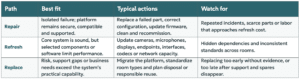
Build the Roadmap by Risk and Business Impact
Once systems are assessed, group them into a rolling roadmap rather than a single, disruptive replacement event. A useful sequence is:
- Stabilize now: Address active failures, security exposure and mission-critical continuity risks.
- Refresh next: Improve high-use spaces where targeted changes can materially improve reliability or user experience.
- Plan replacement: Budget and schedule systems approaching support, compatibility or capacity limits before they become emergencies.
- Monitor and reassess: Keep healthy, supported systems in service while tracking performance, incidents and changing user needs.
Standardization should be part of that roadmap, but it should not become an excuse to discard useful assets. Q-SYS’s ISE 2026 demonstrations highlighted standardized, repeatable room deployment along with Q-SYS Reflect features for space management, system reliability, service integration and operational dashboards. That combination reflects a larger industry direction: standards make environments easier to deploy, while visibility makes them easier to operate and improve
A Smarter Lifecycle is Continuous – NOT Reactive
The strongest technology lifecycle programs do not wait for a device to fail or a budget season to begin. They maintain an accurate inventory, track manufacturer milestones, collect performance data, listen to users and review risk on a regular cadence. That creates time to test solutions, coordinate stakeholders and invest where the business benefit is clearest.
Repair, refresh and replacement are not competing philosophies. They are three tools in the same strategy. Used thoughtfully, they help organizations protect uptime, strengthen security, improve the user experience and avoid both premature spending and costly delay.
A-V Services helps organizations assess complex AV and collaboration environments, identify lifecycle risk and build practical roadmaps supported by proactive monitoring and responsive service. To begin evaluating your technology estate, connect with the A-V Services team today!
————–
SOURCES
- AVIXA, “2026 AV Industry Trends” (January 8, 2026)
- Commercial Integrator, “AVoIP Grows Up: From Adoption to Operational Maturity” (2026)
- AVIXA, “Sustainable AV Practices for Integrators” (2026)
- Cisco, “End-of-Sale and End-of-Life Hub” (accessed August 2026)
- Crestron, “Crestron at the ISE 2026 Expo: A Recap” (February 6, 2026)
- Q-SYS, “ISE 2026 On Demand”
- A-V Services, “Harmony: Intelligent Remote Monitoring” (accessed August 2026)
